Put Claude to work in your business, one task at a time.
An importable Claude skill and a 19-chapter guide that help you set up email triage, customer follow-ups, invoicing, and more. The skill walks you through the setup and adapts ready-to-use instructions to your company. You connect your tools and do the building. $19.99, one time.
One-time payment. Not a subscription. No refunds — it is a download, so read Part 1 free first. Free updates to this edition for a year.
From “help me follow up” to an email you can review.
We gave Claude the toolkit skill and a fictional landscaping business, then asked: “Help me follow up on unpaid invoices.”
The example used invoice DEMO-1042 for a seasonal yard cleanup, seven days overdue, with no previous reminder. The owner’s rules: no late fees, and every message needs approval.
The email Claude drafted
Draft for owner review — not sent
Subject: Quick note on your invoice — DEMO-1042
Hi Alex,
Just a friendly note that invoice DEMO-1042 for $240 (seasonal yard cleanup) is now a week past due. No worries if it slipped your mind — happens to everyone.
You can pay here: [existing invoice payment link]
If anything’s off with the invoice or the timing’s tricky, just reply and let us know — happy to work with you.
Thanks,
Jamie
Harbor Example Landscaping
The business, customer and invoice are fictional. The payment-link placeholder is intentionally inactive.
The checks Claude included before sending
These are also excerpts from the same response:
- Confirm in QuickBooks Online that DEMO-1042 is still open (not already paid or disputed) — this demo did not check any real account.
- Confirm the payment link is the correct, existing accounting-system link — no new link created.
- Confirm customer name, invoice number, and amount match the accounting record exactly.
- Jamie sends the email personally — this workflow drafts, it does not send.
Source: Chapter 7 — Invoicing and Getting Paid. Your output will depend on your business details and instructions.
No refunds — it is a download. The free sample is the whole of Part 1.
Have it built, or build it yourself.
These are the same ideas at two different prices. Most of what we build for clients is in the guide. The difference is who does the work.
Full service
$495 flat, one automation
We scope it, build it, connect it to the tools you already pay for, and hand it over. You own it. Nothing to learn, nothing to maintain.
DIY Toolkit
$19.99 one time
You get the same map and do the building. 19 chapters, the prompts written out, and an advisor that walks you through each setup step. Setup time depends on your task, accounts and permissions. Start with a draft before connecting a live workflow.
Five things, and the map is the biggest one.
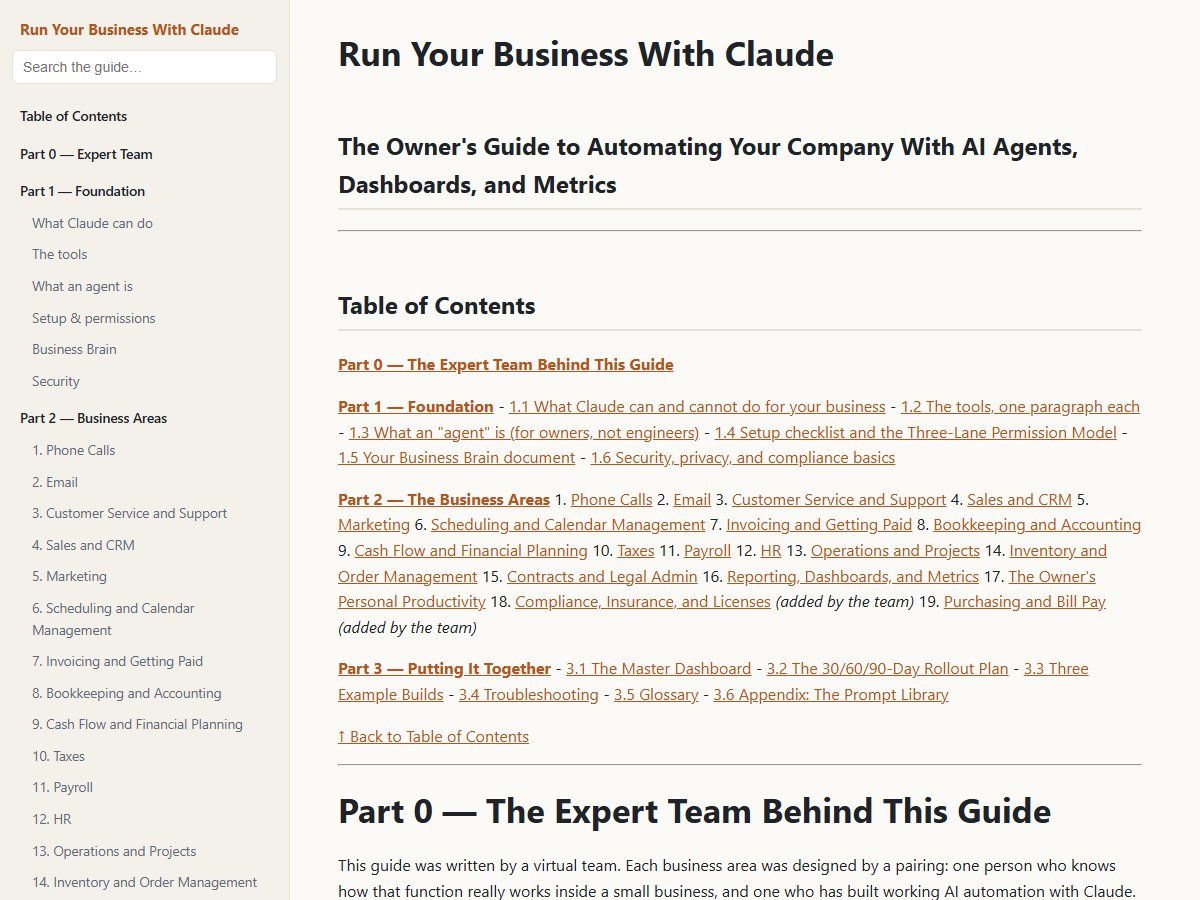
The Guide
19 chapters, 29,000 words, written for owners rather than engineers. Every chapter has the same ten sections, so you can jump straight to the one you need: what it looks like automated, what the AI does versus what you still do, the tools to connect, numbered setup steps, copy-and-paste agent instructions, the scheduled tasks to switch on, the five to eight metrics that matter, guardrails, and how it connects to everything else.
The Advisor Skill
Import one file into Claude and it becomes your implementation coach. Ask “where do I start?” or “set up invoicing for my landscaping company” and it answers from the guide, one step at a time, filling the prompts in with your details.
The Interactive Web Edition
One HTML file. Clickable contents, live search, and a Copy button on every prompt. Opens in any browser, on any device, with nothing installed.
The Business Brain template
A two-page company fact sheet every agent reads, so you explain your business once instead of every time.
The Three-Lane Permission Model
The safety system running through every chapter: what AI does alone, what it prepares for your approval, and what only a person should ever do — move money, run payroll, sign, hire, fire, file taxes.
The 19 chapters
| Front office | Money | People & operations | Running the business |
|---|---|---|---|
| Phone answering (24/7 AI receptionist) | Invoicing & collections | Payroll pre-check | Owner’s daily briefing |
| Email triage & replies | Bookkeeping & month-end close | HR: hiring to offboarding | Dashboards & metrics |
| Customer service & tickets | Cash-flow forecasting | Operations, SOPs & vendors | Compliance & licenses |
| Sales & CRM follow-up | Taxes & year-end organizer | Inventory & orders | Contracts & renewals |
| Marketing & reviews | Bill pay & purchasing | Scheduling & reminders | 30/60/90-day rollout plan |
Buy it, import it, start with one area.
- STEP ONE
Buy
$19.99, one time. Stripe brings you straight back to your download — nothing is emailed, nothing to wait for.
- STEP TWO
Import the skill
Enable code execution in Settings → Capabilities. Open Customize → Skills → Add (or + Create skill) → Upload skill. Upload the toolkit ZIP exactly as you downloaded it — it is the skill.
START-HERE.mdinside walks you through it, and covers the Project route if Skills are off on your plan. - STEP THREE
Prepare one useful draft
Give the skill your business details, then ask it to draft an invoice reminder using details you supply. Review the amount, recipient and wording. Connect your tools when you are ready; nothing needs to be sent for this first task.
Seven things to ask it first
Copy any of these into a new conversation once the skill is installed.
Where do I start? I run a [type of business] with [#] employees.Walk me through setting up email triage, one step at a time.Write the phone receptionist instructions for my company. We’re [name], a [what you do] in [city]. Hours are [hours]. Services: [list].What can the AI do by itself for invoicing, and what still needs me?Build my Business Brain. Interview me one section at a time.Give me the 30/60/90-day rollout plan and tell me what to do this week.Which 8 numbers should be on my dashboard, and what does “healthy” look like for each?
Who it’s for, and what it isn’t.
Owners and managers of businesses with 1–50 people — service companies, trades, retail and e-commerce, agencies, clinics, professional practices — who use Claude, or are about to, and want a complete map rather than a pile of tips.
Three worked example builds are included: a home-services company, an e-commerce brand, and a professional practice.
It is not a course, not a subscription, and not legal, tax or HR advice. Every place that needs a licensed professional is marked as such in the chapter it appears in.
It is also not much use if you are not going to open it. If your week is already full, the full-service route exists for exactly that reason.
The things people ask.
Do I need a paid Claude plan?
Not just to import the skill. Free, Pro, Max, Team and Enterprise support skills with code execution enabled. Some workflows need additional Claude features or connected tools, which may cost extra. Those costs are separate from the toolkit. Team and Enterprise settings may restrict uploads.
Is this a subscription?
No. One payment of $19.99. Free updates to this edition for a year.
How do I get the file after I pay?
Straight away. Stripe sends you back to a download page and the file is right there — nothing is emailed, nothing to wait for.
That download link works for 36 hours, so save the file somewhere you will find it again. After that the link stops working. If you miss the window, email support@tech-d-enterprise.com from the address you paid with and we will send it straight over.
What is the refund policy?
There are no refunds on the toolkit — it is a download, and you have the whole thing the moment you open it. That is why Part 1 is free to read first: read it before you buy and you will know exactly what the other eighteen chapters look like.
What if I get stuck?
Email support@tech-d-enterprise.com with the chapter number and what you asked Claude.
If you would rather talk it through, or you want someone to do the implementing, that is a phone call: book fifteen minutes and we will work out whether you need an hour of help or a full build.
Does this replace my accountant or my lawyer?
No, and the guide says so in every chapter where it matters. Payroll, taxes, contracts and compliance all have a human-only lane, and the Three-Lane model exists precisely so automation stops at the right line.
Is this affiliated with Anthropic?
No. This is an independent product, not affiliated with or endorsed by Anthropic. Claude is a trademark of Anthropic, PBC.
$19.99, once, and the map is yours.
Nineteen chapters, the prompts written out, and an advisor that walks you through the setup. There are no refunds — it is a download — so read Part 1 first if you would rather see it before you pay.